Home
Home

Products
Auto Backup Software
Net Time Server & Client
Internet Secure Tunneling
UninsHs

Component
Barcode VCL Component

Download
Free Download
Translations
Freeware Download

Purchase
Price List
Buy Now
Win a Free Product

Support
FAQs
Submit a Question
Forgot License Key

Contact
Contact Us
Guestbook
Company Info
Other Links

FAQs

Auto Backup:

  Which license of Auto Backup is right for me?

  May I use Auto Backup to backup files to my CD-R/CD-RW?

  Does the program backup to external hard disks connected via USB and to zip drives?

  Can I perform backup of different files or folders at a time?

  Is it possible to backup an open file which is in use by another program?

  Create a backup of all files on the C-Drive into an archive on other Drive. But the task crash?

  Why is the backup archive zero size?

  Do our Auto Backup not work with Windows XP?

  Does Auto Backup work as service?

  How to create backup archives to network folder when Auto Backup work as service?

  Why does not the Auto Backup work in Windows NT4/2000/XP/2003?

  Why does not the Auto Backup work in Windows 95/NT4?


NetTime Server & Client:

  The program says that it cannot find a dll, How do I correct this?

  Why does my PC clock show wrong time after synchronized it?

  How to synchronize the Unix, FreeBsd, Linux, etc. system?

  I don not have an Internet connection, how to synchronize my computers in a LAN?

  Why does not the Net Time SNTP server work when it run as Windows NT4/2000/XP/2003 service?


Internet Secure Tunneling:

  What is an identity file?

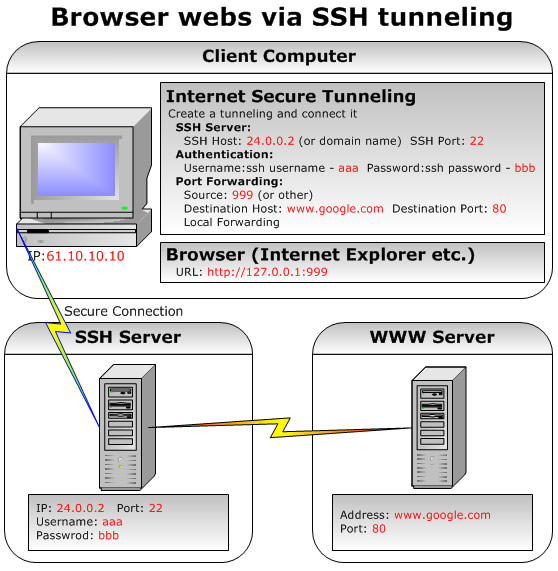
  How to use the program?

  How to use proxy server via SSH?


Barcode VCL Component:

  What is a bar code?

  What is in a bar code?

  How to use the bar code component?

  How can I save the bar code as an image?

  How can I use bar codes in database applications?

  Which version does the Barcode VCL Component work with Delphi and C++Builder?

  How to change the subsets in a Code128 or an EAN128 barcode?

  How to insert the FNC1 to barcode?


Others:

  How to buy our products and component?

  How to register our softwares?

  What if I forget my License Key?

  Why does not the License key work?

  The License Key does not work after upgrade the software, What have I to do?

  Do I have to pay for the upgrades?

  Is technical support free?

  I have more questions - who should I write to?


Which license of Auto Backup is right for me?

The Auto Backup with site license can work as a WindowsNT/2000/XP service. So, if you want to run Auto Backup as a Windows NT/2000/xp service without being properly logged into your computer, the site license is required.

May I use Auto Backup to backup files to my CD-R/CD-RW?

Yes. Writing to CD-R/CD-RW disks is supported if they have been pre-formatted to accept direct file writes. Some other software can help you pre-format it, such as DirectCD and InCD. After you add or remove files to your CD-R/CD-RW with Auto Backup, please open windows explorer and Right-clicking on the CD recording drive and select "Write these files to CD".

Does the program backup to external hard disks connected via USB and to zip drives?

Yes. The program supports backup to USB and zip drives and works with them in the same way as with local drives.

Can I perform backup of different files or folders at a time?

Yes. You can backup as many files or folders as you need in one backup task. You can create many backup tasks, and they can work at a time.

Is it possible to backup an open file which is in use by another program?

Yes. It is possible. To be backed up, such files should have read access. Auto Backup does not backup files that not accessible for reading (particularly, system files like pagefile.sys, file opened without sharing permission, loaded modules EXEs and DLLs, etc.), you can specify the "Ignore locked files" to skip them.

Create a backup of all files on the C-Drive into an archive on other Drive. But the task crash?

Please skip the swap file called WIN386.SWP, and skip others locked files such as ntuser.dat, ntuser.dat.log, pagefile.sys, etc.

Why is the backup archive zero size?

Please check your sources, if some files are locked, please skip them(you can specify the "Ignore locked files"), or if some files are being use, please close them.

Does Auto Backup work with Windows XP?

Yes. Auto Backup works with Windows XP. We have tested Auto Backup with Windows XP. Many of our customers have also reported that Auto Backup works with the final release of Windows XP.

Does Auto Backup work as service?

Yes. If you use Windows NT/2000/XP/2003, the Auto Backup professional edition can work as a service.

How to create backup archive to network folder when Auto Backup work as service?

Please click the "Service" button to open the "Auto Backup Service manager" dialog, change the "Log on" to "This account" and specifies your account name and password.

Why does not the Auto Backup work in Windows NT/2000/XP/2003?

You must probably have Administrator privileges for use Auto Backup.

Why does not the Auto Backup work in Windows 95/NT4?

You need to install the IE 4.01 or higher.

The program says that it cannot find a dll, How do I correct this?

You need to install the Dial-up Networking.

Why does my PC clock show wrong time after synchronized it?

For correct working of this program right time zone must be set in the operation system.
Test it please:
1) Double click to the system time indicator in the right down corner of the screen.
2) Choose the "Time Zone" form bookmark. Correct zone if it is wrong.

How to synchronize the Unix, FreeBsd, Linux, etc. system?

Please run the server as a SNTP server. If your server cannot synchronize to an Internet time server, please uncheck the "Use synchronized flag", "User reference time stamp", and "Stop when not synchronized" boxes in "Server" tab sheet.

I don not have an Internet connection, how to synchronize my computers in a LAN?

For the time server, please uncheck the "Use synchronized flag", "User reference time stamp", and "Stop when not synchronized" boxes in "Server" tab sheet.
For the time client, please uncheck the "Check synchronized flag" box in "Client" tab sheet.

Why does not the Net Time SNTP server work when it run as Windows NT4/2000/XP/2003 service?

Please disable the "Windows Time" service or change the SNTP server port to other such as 124, etc. then re-start the Net Time Server & Clinet. The port 123 is used by "Windows Time" service.

What is an identity file?

The identity file is used instead of your password when logging in, with an identity file can be made a connection establishment without password. So keep it secret as anyone having access to this file can log on to your computer.

How to use the program?

Please click these examples to view them. Example1 Example2 Example3 Example4 Example5 Example6 Example7 Example8

How to use proxy server via SSH?

You need create a dynamic forwarding tunnel via SSH, then you can use your local host as a SOCKS proxy server.

What is a bar code?

Bar codes are machine-readable symbols made of patterns of black and white bars and stripes, or in some cases checkerboard-like grids. There are different styles of bar codes called symbologies.

What is in a bar code?

Bits of information are encoded within bar codes. The data is read by bar code scanners and is often used in conjunction with databases. Bar codes don't require human-input, can be read by automated machines, and is virtually error-free.

How to use the bar code component?

Please click here to view a manual.

How can I save the bar code as an image?

Firstly, draw the bar code on a canvas object. Then save it to a image file from this canvas object.

How can I use bar codes in database applications?

You can use TDBBarcode component, It can work with TDataSet and sub-classes of TDataSet, such as TQuery, TTabel, etc.

Which version does the Barcode VCL Component work with Delphi and C++Builder?

Delphi 4/5/6/7 and C++ Builder 5/6.

How to change the subsets in a Code128 or an EAN128 barcode?

Switch subset C to subset A, please insert the "CA"(character 'C' and character 'A'),
Switch subset C to subset B, please insert the "CB"(character 'C' and character 'B'),
Switch subset A or subset B to subset C, please insert the chr(199),
Switch subset A to subset B, please insert the chr(200),
Switch subset B to subset A, please insert the chr(201).

How to insert the FNC1 to barcode?

If you use the Code128A, Code128B, EAN128A or EAN128B barcode, please insert the char(202) for it. Example: Barcode1.Barcode := 'ABC' + char(202) + 'DEF';

If you use the Code128C or EAN128C barcode, please insert the "F1" for it.
Example: Barcode1.Barcode := '0023F1245678';

How to buy our products and components?

You can click HERE to make an secure online purchase. After your order is completed and payment received, a License Key of software or a full version download link of component will be sent to you immediately via email.

How to register our softwares?

Please open the PURCHASE dialog in the software, input the UserName, UserMail and License Key, then press the REGISTER button.

What if I forget my License Key?

Please click HERE, then fill out the product name and your e-mail address the purchase was made with, your License Key will be sent to this e-mail address immediately.

Why does not the License Key work?

Not only License Key but also user name and email must be entered correct too. and they are case sensitive.

The License Key does not work after upgrade the software, What have I to do?

Please click HERE, then fill out the product name and your e-mail address the purchase was made with, your new License Key will be sent to this e-mail address immediately.

Is technical support free?

Yes! It's free.

I have more questions - who should I write to?

Please write our GuestBook, or click HERE to send your question, or you can send your questions to support@han-soft.com directly too.
If you have a problem with your order, please visit the ShareIt Customer Care Center (if you are not a registered user, please visit here), or Emetrix Customer Support Home.

Web:http://www.han-soft.com
  Copyright©2001, 2010 Han-soft Software. All rights reserved.   Contact Us|Privacy Policy