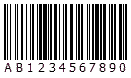
 The component is used to create the Code128 barcode symbol. It's defined in the pCode128 unit.
The component is used to create the Code128 barcode symbol. It's defined in the pCode128 unit.
The Code 128 barcode symbology is also known as ANSI/AIM 128, ANSI/AIM Code 128, USS Code 128, Uniform Symbology Specification Code 128, Code 128 Code Set A, Code 128 Code Set B, Code 128 Code Set C, Code 128A, Code 128B, Code 128C, etc. It is is a very high-density barcode symbology. It is used for alphanumeric or numeric-only barcodes.
It can encode all 128 characters of ASCII character sets. This is done by switching between all 3 character subsets of Code 128:
Note, only an even number of digits can be encoded if using the character subset C.
If the EncodeMode property is set to cemAuto, the character subset will be switched automatically in a Code 128 symbol in order to minimize the symbol size. If it is set to cemManual, you need to switch the character subset manually by using following function symbols:
Also, you can manually switch the character subset by using these function symbols even if the EncodeMode property is set to cemAuto.
Characters with ASCII values 128 to 255 in accordance with ISO 8859-1:1998 may also be encoded. This is done by using the "FNC 4" symbol together with character subsets A, B and C. If the EncodeMode property is set to cemAuto, the "FNC 4" will be inserted automatically depending on the barcode text in order to minimize the symbol size. If it is set to cemManual, you need to insert the "FNC 4" symbol manually by using "\4".
If a single "FNC 4" character is used, indicates the following data character in the symbol is a extended ASCII character. A "SHIFT" character may follow the "FNC 4" character if it is necessary to change character subset for the following data character. Subsequent data characters revert to the standard ASCII character set. If two consecutive "FNC4" characters are used, all following data characters are extended ASCII characters until two further consecutive "FNC4" characters are encountered or the end of the symbol is reached. If during this sequence of extended encodation a single "FNC4" character is encountered it is used to revert to standard ASCII encodation for the next data character only. "SHIFT" and character subset characters shall have their normal effect during such a sequence.
Also, the "FNC 1", "FNC 2", and "FNC 3" symbols can be used for special purposes. You can use the escape sequences "\1", "\2", and "\3" to place them to the barcode text.
Note, if you want to place the "\" character to barcode text, please use the "\\" escape sequence.
See also the InitialSubSet and the EncodeMode properties.
(*): The Data property, OnEncode, OnDecodeText, OnInvalidDataLength, and OnInvalidDataChar events are available only for the Delphi/C++ Builder 2009 or later.