Specifies the left margin of the barcode symbol in pixels.
property LeftMargin: Integer;
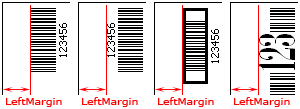
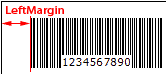
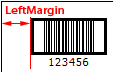
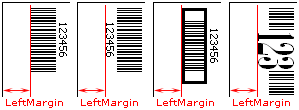
Specifies the margin between the leftmost side of the barcode symbol and the left side of the TImage, TQRImage, or TQRGzImage control that is specified by the Image property, in pixels. See diagram:
If the human readable text is displayed, it's included in the barcode symbol. See diagram:
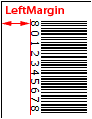
For TBarcode1D_UPCA, TBarcode1D_UPCE, TBarcode1D_UPCE0, TBarcode1D_UPCE1, TBarcode1D_EAN2, TBarcode1D_EAN5, TBarcode1D_EAN8, and TBarcode1D_EAN13 barcode components, if the human readable text is displayed, and the TextAlignment property is set to taCustom, the left and right quiet zones marks and their horizontal spacing are included in the barcode symbol too. See diagram:
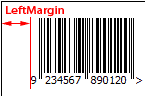
For TBarcode1D_ITF6, TBarcode1D_ITF14, and TBarcode1D_ITF16 barcode components, all bearer bars, the left and right spacing are included in the barcode symbol too. See diagram:
If the human readable text is displayed and it exceeds the barcode symbol in horizontal or vertical direction, the excess is included in the barcode symbol too. See diagram:
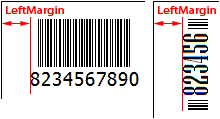
It is set using the following formula:
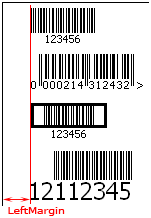
The Orientation property is set to "boLeftRight":
It is the margin between the beginning of the barcode symbol and the left side of the TImage, TQRImage, or TQRGzImage control.
For TBarcode1D_UPCA, TBarcode1D_UPCE, TBarcode1D_UPCE0, TBarcode1D_UPCE1, TBarcode1D_EAN2, TBarcode1D_EAN5, TBarcode1D_EAN8, and TBarcode1D_EAN13 barcode components, if the TextAlignment property is set to "taCustom", it's the margin between the left quiet zone mark and the left side of the TImage, TQRImage, or TQRGzImage control (The ShowQuietZoneMark property of the TBarcode1D_EAN2, TBarcode1D_EAN5, or TBarcode1D_EAN8 barcode component is set to true).
For TBarcode1D_ITF6, TBarcode1D_ITF14, and TBarcode1D_ITF16 barcode components, it's the margin between the left bearer bar and the left side of the TImage, TQRImage, or TQRGzImage control.
When the human readable text is displayed, and the TextAlignment property is set to "taRight", "taRightQuietZone", "taCenter" or "taCenterQuietZone", if the human readable text exceeds the beginning of the barcode symbol, it's the margin between the beginning of the human readable text and the left side of the TImage, TQRImage, or TQRGzImage control.
See diagram:
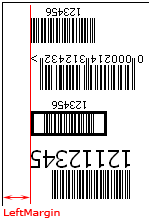
The Orientation property is set to "boRightLeft":
It is the margin between the end of the barcode symbol and the left side of the TImage, TQRImage, or TQRGzImage control.
For TBarcode1D_UPCA, TBarcode1D_UPCE, TBarcode1D_UPCE0, TBarcode1D_UPCE1, TBarcode1D_EAN2, TBarcode1D_EAN5, TBarcode1D_EAN8, and TBarcode1D_EAN13 barcode components, if the TextAlignment property is set to "taCustom", it's the margin between the right quiet zone mark and the left side of the TImage, TQRImage, or TQRGzImage control (The ShowQuietZoneMark property of the TBarcode1D_EAN2, TBarcode1D_EAN5, TBarcode1D_EAN8, or TBarcode1D_EAN13 barcode component is set to true).
For TBarcode1D_ITF6, TBarcode1D_ITF14, and TBarcode1D_ITF16 barcode components, it's the margin between the right bearer bar and the left side of the TImage, TQRImage, or TQRGzImage control.
When the human readable text is displayed, and the TextAlignment property is set to "taLeft", "taLeftQuietZone", "taCenter" or "taCenterQuietZone", if the human readable text exceeds the end of the barcode symbol, it's the margin between the end of the human readable text and the left side of the TImage, TQRImage, or TQRGzImage control.
See diagram:
The Orientation property is set to "boTopBottom":
It is the margin between the bottom of the barcode symbol and the left side of the TImage, TQRImage, or TQRGzImage control.
If the human readable text is displayed and the TextPosition property is set to the "tpBottomIn" or "tpBottomOut", It's the margin between the bottom of the human readable text and the left side of the TImage, TQRImage, or TQRGzImage control.
For TBarcode1D_ITF6, TBarcode1D_ITF14, and TBarcode1D_ITF16 barcode components, if the human readable text isn't displayed or the TextPosition property is set to the "tpTopIn" or "tpTopOut", it's the margin between the bottom bearer bar and the left side of the TImage, TQRImage, or TQRGzImage control.
When the human readable text is displayed, and the TextPosition property is set to the "tpTopIn" or "tpTopOut", if the human readable text exceeds the barcode symbol in height, it's the margin between the bottom of the human readable text and the left side of the TImage, TQRImage, or TQRGzImage control.
See diagram:
The Orientation property is set to "boBottomTop":
It is the margin between the top of the barcode symbol and the left side of the TImage, TQRImage, or TQRGzImage control.
If the human readable text is displayed and the TextPosition property is set to the "tpTopIn" or "tpTopOut", It's the margin between the top of the human readable text and the left side of the TImage, TQRImage, or TQRGzImage control.
For TBarcode1D_ITF6, TBarcode1D_ITF14, and TBarcode1D_ITF16 barcode components, if the human readable text isn't displayed or the TextPosition property is set to the "tpBottomIn" or "tpBottomOut", it's the margin between the top bearer bar and the left side of the TImage, TQRImage, or TQRGzImage control.
When the human readable text is displayed, and the TextPosition property is set to the "tpBottomIn" or "tpBottomOut", if the human readable text exceeds the barcode symbol in height, it's the margin between the top of the human readable text and the left side of the TImage, TQRImage, or TQRGzImage control.
See diagram: