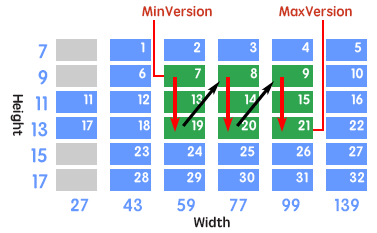
soRowColumn: If the rMQRCode symbol that use minimum symbol version cannot accommodate the barcode text, the number of rows will be increased firstly until it reachs the maximum number of rows (specified by the MaxVersion property) or the barcode text is accommodated by the symbol. If the number of rows has reached the maximum number of rows (specified by the MaxVersion property) but the barcode text cannot yet be accommodated, the number of columns will be increased and the number of rows will be reset to minimum number of rows (specified by the MinVersion property). Repeat these until the barcode text is accommodated by the symbol, or the symbol version reachs maximum symbol version (specified by the MaxVersion property), in this case (tha barcode text cannot always be accommodated), an OnInvalidLength (the barcode text is specified in the Barcode property) or OnInvalidDataLength(only for Delphi/C++ Builder 2009 or later, and the barcode text is specified in the Data property) event will occur. See diagram:
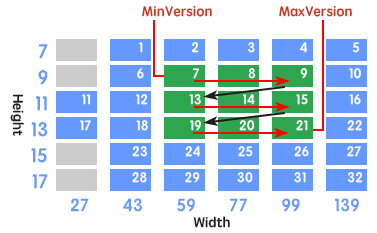
soColumnRow: If the rMQRCode symbol that use minimum symbol version cannot accommodate the barcode text, the number of columns will be increased firstly until it reachs the maximum number of columns (specified by the MaxVersion property) or the barcode text is accommodated by the symbol. If the number of columns has reached the maximum number of columns (specified by the MaxVersion property) but the barcode text cannot yet be accommodated, the number of rows will be increased and the number of columns will be reset to minimum number of columns (specified by the MinVersion property). Repeat these until the barcode text is accommodated by the symbol, or the symbol version reachs maximum symbol version (specified by the MaxVersion property), in this case (tha barcode text cannot always be accommodated), an OnInvalidLength (the barcode text is specified in the Barcode property) or OnInvalidDataLength (only for Delphi/C++ Builder 2009 or later, and the barcode text is specified in the Data property) event will occur. See diagram:
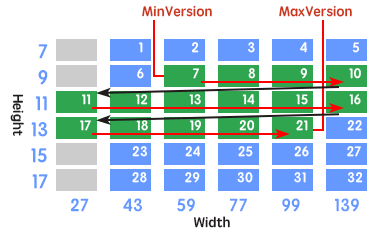
soRowPrior: If the rMQRCode symbol that use minimum symbol version cannot accommodate the barcode text, the number of rows will be increased firstly until it reachs the maximum number of rows defined by the specification or the barcode text is accommodated by the symbol. If the number of rows has reached the maximum number of rows defined by the specification but the barcode text cannot yet be accommodated, the number of columns will be increased and the number of rows will be reset to minimum number of rows defined by the specification. Repeat these until the barcode text is accommodated by the symbol, or the symbol version reachs maximum symbol version (specified by the MaxVersion property), in this case (tha barcode text cannot always be accommodated), an OnInvalidLength (the barcode text is specified in the Barcode property) or OnInvalidDataLength(only for Delphi/C++ Builder 2009 or later, and the barcode text is specified in the Data property) event will occur. See diagram:
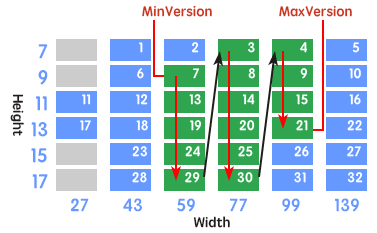
soColumnPrior: If the rMQRCode symbol that use minimum symbol version cannot accommodate the barcode text, the number of columns will be increased firstly until it reachs the maximum number of columns defined by the specification or the barcode text is accommodated by the symbol. If the number of columns has reached the maximum number of columns defined by the specification but the barcode text cannot yet be accommodated, the number of rows will be increased and the number of columns will be reset to minimum number of columns defined by the specification. Repeat these until the barcode text is accommodated by the symbol, or the symbol version reachs maximum symbol version (specified by the MaxVersion property), in this case (tha barcode text cannot always be accommodated), an OnInvalidLength (the barcode text is specified in the Barcode property) or OnInvalidDataLength(only for Delphi/C++ Builder 2009 or later, and the barcode text is specified in the Data property) event will occur. See diagram:
soGlobal_1: All available symbol versions will be sorted in ascending order of data capacity. If the data capacitoies of any two or three symbol versions are equivalent, only smaller one in number of rows will be sorted. According to the order, the smallest symbol version that accommodates the barcode text will be automatically selected between the minimum symbol version (specified by the MinVersion property) and the maximum symbol version (specified by the MaxVersion property). The order is listed below:
For ECCLevel "M": 1, 11, 2, 12, 3, 7, 18, 4, 8, 23, 19, 28, 9, 14, 5, 24, 20, 29, 15, 10, 25, 21, 30, 16, 26, 31, 22, 27, 32
For ECCLevel "H": 1, 11, 2, 3, 7, 18, 4, 13, 8, 19, 28, 9, 14, 5, 24, 29, 15, 25, 10, 21, 30, 16, 26, 22, 31, 27, 32
If tha barcode text cannot be accommodated by the maximum symbol version (specified by the MaxVersion property), an OnInvalidLength (the barcode text is specified in the Barcode property) or OnInvalidDataLength(only for Delphi/C++ Builder 2009 or later, and the barcode text is specified in the Data property) event will occur.
soGlobal_2: All available symbol versions will be sorted in ascending order of data capacity. If the data capacitoies of any two or three symbol versions are equivalent, only smaller one in number of columns will be sorted. According to the order, the smallest symbol version that accommodates the barcode text will be automatically selected between the minimum symbol version (specified by the MinVersion property) and the maximum symbol version (specified by the MaxVersion property). The order is listed below:
For ECCLevel "M": 1, 11, 17, 12, 3, 7, 18, 4, 13, 23, 19, 28, 9, 14, 5, 24, 20, 29, 15, 10, 25, 21, 30, 16, 26, 31, 22, 27, 32
For ECCLevel "H": 1, 11, 17, 3, 12, 18, 4, 23, 8, 19, 28, 9, 14, 5, 24, 29, 20, 25, 10, 21, 30, 16, 26, 22, 31, 27, 32
If tha barcode text cannot be accommodated by the maximum symbol version (specified by the MaxVersion property), an OnInvalidLength (the barcode text is specified in the Barcode property) or OnInvalidDataLength(only for Delphi/C++ Builder 2009 or later, and the barcode text is specified in the Data property) event will occur.
soGlobal_3: All available symbol versions will be sorted in ascending order of data capacity. If the data capacitoies of any two symbol versions are equivalent, only smaller one in number of rows will be sorted. If the data capacitoies of any three symbol versions are equivalent, only middle one in number of rows and columns will be sorted. According to the order, the smallest symbol version that accommodates the barcode text will be automatically selected between the minimum symbol version (specified by the MinVersion property) and the maximum symbol version (specified by the MaxVersion property). The order is listed below:
For ECCLevel "M": 1, 11, 6, 12, 3, 7, 18, 4, 8, 23, 19, 28, 9, 14, 5, 24, 20, 29, 15, 10, 25, 21, 30, 16, 26, 31, 22, 27, 32
For ECCLevel "H": 1, 11, 6, 3, 7, 18, 4, 13, 8, 19, 28, 9, 14, 5, 24, 29, 15, 25, 10, 21, 30, 16, 26, 22, 31, 27, 32
If tha barcode text cannot be accommodated by the maximum symbol version (specified by the MaxVersion property), an OnInvalidLength (the barcode text is specified in the Barcode property) or OnInvalidDataLength(only for Delphi/C++ Builder 2009 or later, and the barcode text is specified in the Data property) event will occur.
soGlobal_4: All available symbol versions will be sorted in ascending order of data capacity. If the data capacitoies of any two symbol versions are equivalent, only smaller one in number of columns will be sorted. If the data capacitoies of any three symbol versions are equivalent, only middle one in number of rows and columns will be sorted. According to the order, the smallest symbol version that accommodates the barcode text will be automatically selected between the minimum symbol version (specified by the MinVersion property) and the maximum symbol version (specified by the MaxVersion property). The order is listed below:
For ECCLevel "M": 1, 11, 6, 12, 3, 7, 18, 4, 13, 23, 19, 28, 9, 14, 5, 24, 20, 29, 15, 10, 25, 21, 30, 16, 26, 31, 22, 27, 32
For ECCLevel "H": 1, 11, 6, 3, 12, 18, 4, 23, 8, 19, 28, 9, 14, 5, 24, 29, 20, 25, 10, 21, 30, 16, 26, 22, 31, 27, 32
If tha barcode text cannot be accommodated by the maximum symbol version (specified by the MaxVersion property), an OnInvalidLength (the barcode text is specified in the Barcode property) or OnInvalidDataLength(only for Delphi/C++ Builder 2009 or later, and the barcode text is specified in the Data property) event will occur.