Canvas: TCanvas; Specifies target canvas to represent the barcode symbol on it.
For the TBarcode2D_CCA, TBarcode2D_CCB, and TBarcode2D_CCC barcode components, if the Linear property is set, the 2D symbol and the linear symbol are assembled to generate an EAN.UCC composite barcode symbol. Both of them will be drawn on the specified canvas.
Data: AnsiString; Specifies the barcode text. It is of type AnsiString.
For the Delphi/C++ Builder 2009 or later, you can use the method to encode a block of binary (bytes) data into a barcode symbol. Or specifies the barcode text in AnsiString format.
If you want to encode a block of binary (bytes) data into a barcode symbol under Delphi/C++ Builder 2007 or early, please use the DrawTo (Syntax 2) overloading method.
For the TBarcode2D_RSS14 and TBarcode2D_RSSLimited components, if the property AutoCheckDigit is set to true, the check digit doesn't need to be included in the parameter, otherwise the check digit can be specified by you in the parameter.
For the TBarcode2D_CCA, TBarcode2D_CCB, and TBarcode2D_CCC barcode components, if the Linear property is set, the 2D symbol and the linear symbol are assembled to generate an EAN.UCC composite barcode symbol. The parameter only specifies the barcode text for the 2D symbol, the barcode text of linear symbol is specified by the Barcode or Data (only for Delphi/C++ Builder 2009 or later) property of the linear component.
See also the "Barcode" and "Data" (only for Delphi/C++ Builder 2009 or later) properties.
BarColor: TColor; In general, the Inversed property is set to false. In this case, the parameters specifies the color for all bars (Stacked 2D barcode symbology and Linear 1D barcode symbology) or dark modules (Matrix 2D barcode symbology) in the barcode symbol.
If the Inversed property is set to true, it specifies the color for all spaces (Stacked 2D barcode symbology and Linear 1D barcode symbology) or light modules (Matrix 2D barcode symbology) in the barcode symbol. Also, if the ShowQuietZone parameter value is set to true, the leading, trailing, top, and bottom quiet zones are represented using the color.
For the 2D component TBarcode2D_CCA, TBarcode2D_CCB, or TBarcode2D_CCC, if its Linear property is set, the 2D symbol and the linear symbol are assembled to generate an EAN.UCC composite barcode symbol, the parameter is in effect for entire EAN.UCC composite symbol (including both 2D and linear symbols).
See also the "BarColor" property.
SpaceColor: TColor; In general, the Inversed property is set to false. In this case, the parameters specifies the color for all spaces (Stacked 2D barcode symbology and Linear 1D barcode symbology) or light modules (Matrix 2D barcode symbology) in the barcode symbol. Also, if the ShowQuietZone parameter value is set to true, the leading, trailing, top, and bottom quiet zones are represented using the color.
If the Inversed property is set to true, it specifies the color for all bars (Stacked 2D barcode symbology and Linear 1D barcode symbology) or dark modules (Matrix 2D barcode symbology) in the barcode symbol.
For the 2D component TBarcode2D_CCA, TBarcode2D_CCB, or TBarcode2D_CCC, if its Linear property is set, the 2D symbol and the linear symbol are assembled to generate an EAN.UCC composite barcode symbol, the parameter is in effect for entire EAN.UCC composite symbol (including both 2D and linear symbols).
See also the "SpaceColor" property.
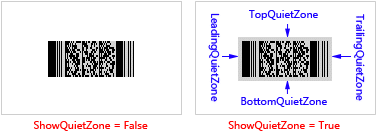
ShowQuietZone: Boolean; Specifies whether to represent the leading, trailing, top and bottom quiet zones. If the parameter value is set to true, these quiet zones are represented. Otherwise, they don't be represented. You can use the LeadingQuietZone, TrailingQuietZone, TopQuietZone, and BottomQuietZone properties to specify the size of these quiet zones in modules. See diagram (the SpaceColor parameter is set to clSilver in order to accentuate the quiet zones):
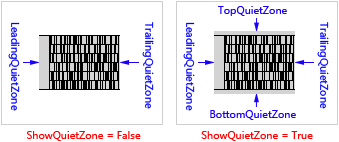
For the TBarcode2D_Code16K barcode component, the leading quiet zone and the trailing quiet zone will be represented always, even if the ShowQuietZone parameter value is set to false. See diagram (the SpaceColor parameter is set to clSilver in order to accentuate the quiet zones):
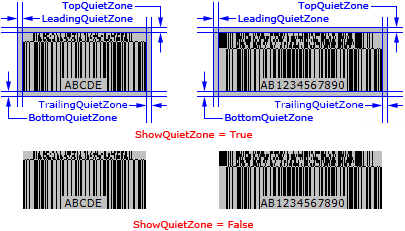
For the TBarcode2D_CCA, TBarcode2D_CCB, and TBarcode2D_CCC barcode components, if the Linear property is set, the 2D symbol and the linear symbol are assembled to generate an EAN.UCC composite barcode symbol. And the LeadingQuietZone, TrailingQuietZone, TopQuietZone, and BottomQuietZone properties specify the size of quiet zones for entire EAN.UCC composite symbol, they are not only for the 2D symbol. See diagram (the SpaceColor parameter value is set to clSilver in order to accentuate the quiet zones):
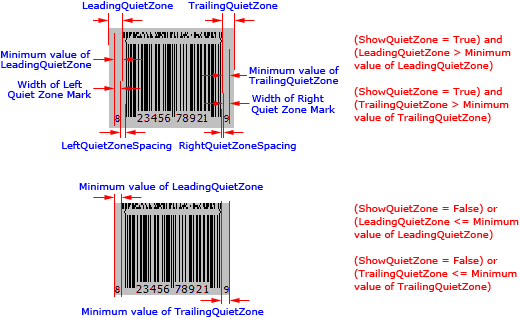
For the TBarcode2D_CCA and TBarcode2D_CCB barcode components, if the linear component is the TBarcode1D_UPCE, TBarcode1D_UPCE0, TBarcode1D_UPCE1, TBarcode1D_UPCA, TBarcode1D_ENA8, or TBarcode1D_EAN13, and its left quiet zone mark is represented (the TextAlignment property's value is set to taCustom, and for the TBarcode1D_ENA8 component, the ShowQuietZoneMark property is set to true too), the leading quiet zone will be represented even if the ShowQuietZone parameter is set to false, the minimum width of leading quiet zone is the distance between the left side of the left quiet zone mark of the linear symbol and the first bar of the 2D symbol, and the minimum width of leading quiet zone will be used if the value of LeadingQuietZone property is less than it. Similarly, if its right quiet zone mark is represented (the TextAlignment property's value is set to taCustom, and for the TBarcode1D_ENA8 and TBarcode1D_EAN13 components, the ShowQuietZoneMark property is set to true too), the trailing quiet zone will be represented even if the ShowQuietZone parameter is set to false, the minimum width of trailing quiet zone is the distance between the last bar of the 2D symbol and the right side of the right quiet zone mark of the linear symbol, and the minimum width of trailing quiet zone will be used if the value of TrailingQuietZone property is less than it. In other words, the leading and trailing quiet zoens will be automatically extanded to cover the left and right quiet zone marks, regardless of whether the ShowQuietZone parameter is set to true or false. See diagram (the SpaceColor parameter value is set to clSilver in order to accentuate the quiet zones):
For all of the TBarcode2D_CCA, TBarcode2D_CCB, and TBarcode2D_CCC barcode components, if the linear component is the TBarcode1D_UPCE, TBarcode1D_UPCE0, TBarcode1D_UPCE1, TBarcode1D_UPCA, TBarcode1D_ENA8, TBarcode1D_EAN13, or TBarcode1D_EAN128, and its human readable text is represented and exceeds the beginning or end of entire EAN.UCC barcode symbol (the leading and trailing quiet zones are included if the ShowQuietZone parameter is set to true), the leading and trailing quiet zoens will be automatically extanded to cover the human readable text, regardless of whether the ShowQuietZone parameter is set to true or false. See diagram (the SpaceColor parameter value is set to clSilver in order to accentuate the quiet zones):
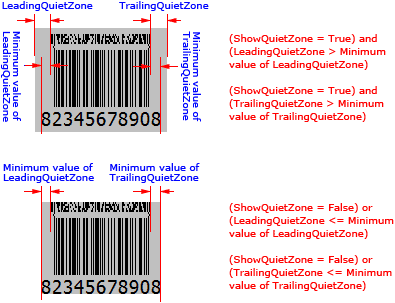
In general, the Inversed property is set to false. In this case, these quiet zones are represented using the color specified by SpaceColor parameter. If the Inversed property is set to true, these quiet zones are represented using the color specified by BarColor parameter.
See also the "ShowQuietZone" property.
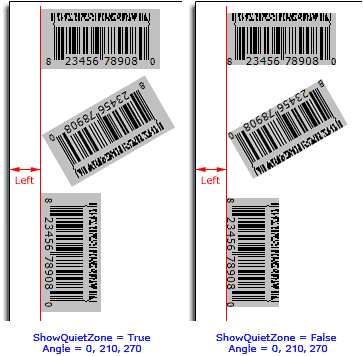
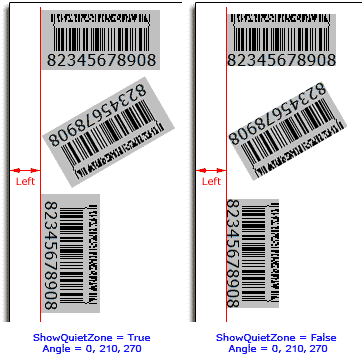
Left: Integer; Specifies the margin between the rotated barcode symbol and the left side of the canvas in logical dots or pixels in the horizontal direction. If the quiet zones are represented (please read the ShowQuietZone parameter section above about whether or not the quiet zones will be represented), they are included in the barcode symbol. See diagram (the SpaceColor parameter value is set to clSilver in order to accentuate the quiet zones):
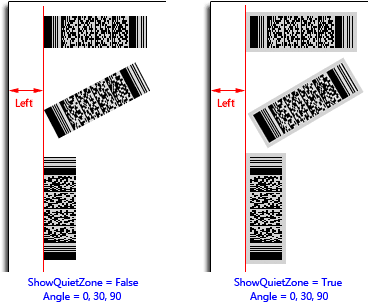
For the TBarcode2D_Code16K barcode component, the leading quiet zone and the trailing quiet zone are included always, even if the ShowQuietZone parameter is set to false. See diagram (the SpaceColor parameter value is set to clSilver in order to accentuate the quiet zones):
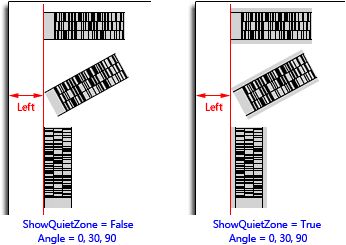
For the TBarcode2D_CCA, TBarcode2D_CCB, and TBarcode2D_CCC components, if the Linear property is set, the 2D symbol and the linear symbol are assembled to generate an EAN.UCC composite barcode symbol. The linear symbol is included in the composite barcode symbol, and the parameter specifies the left margin for entire rotated EAN.UCC composite barcode symbol not for the 2D symbol. See diagram (the SpaceColor parameter value is set to clSilver in order to accentuate the quiet zones):
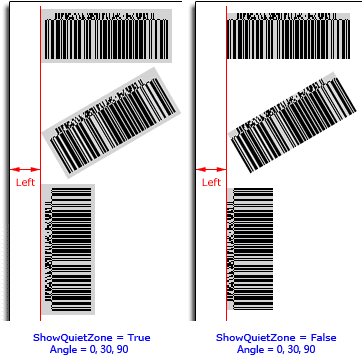
When the linear component of TBarcode2D_CCA, TBarcode2D_CCB, or TBarcode2D_CCC component is TBarcode1D_UPCA, TBarcode1D_UPCE, TBarcode1D_UPCE0, TBarcode1D_UPCE1, TBarcode1D_EAN8, TBarcode1D_EAN13, or TBarcode1D_EAN128, and its human readable text is represented. The human readable text and the vertical spacing between the text and linear symbol are included in the symbol. If the TextAlignment property isn't set to taCustom, and the human readable text exceeds entire EAN.UCC composite barcode symbol in horizontal direction, the excess is included in the symbol. If the TextAlignment property is set to taCustom, the width of quiet zone marks and their horizontal spacing (LeftQuietZoneSpacing and RightQuietZoneSpacing) are included in the symbol too (if they are represented, this does not apply to TBarcode1D_EAN128). The parameter always specifies the left margin for entire rotated EAN.UCC composite symbol. See diagram (the SpaceColor parameter value is set to clSilver in order to accentuate the quiet zones):
See also the "LeftMargin" property.
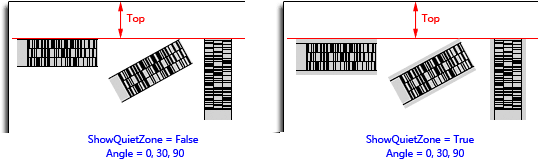
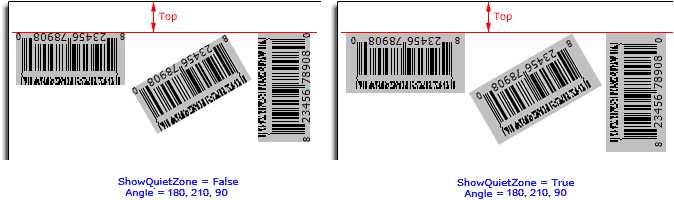
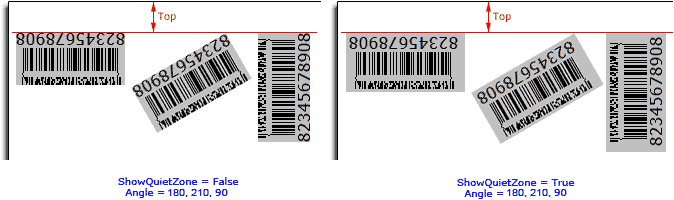
Top: Integer; Specifies the margin between the rotated barcode symbol and the top side of the canvas in logical dots or pixels in the vertical direction. If the quiet zones are represented (please read the ShowQuietZone parameter section above about whether or not the quiet zones will be represented), they are included in the barcode symbol. See diagram (the SpaceColor parameter value is set to clSilver in order to accentuate the quiet zones):
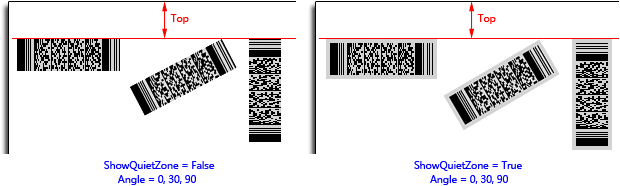
For the TBarcode2D_Code16K barcode component, the leading quiet zone and the trailing quiet zone are included always, even if the ShowQuietZone parameter is set to false. See diagram (the SpaceColor parameter value is set to clSilver in order to accentuate the quiet zones):
For the TBarcode2D_CCA, TBarcode2D_CCB, and TBarcode2D_CCC components, if the Linear property is set, the 2D symbol and the linear symbol are assembled to generate an EAN.UCC composite barcode symbol. The linear symbol is included in the composite barcode symbol, and the parameter specifies the top margin for entire rotated EAN.UCC composite barcode symbol not for the 2D symbol. See diagram (the SpaceColor parameter value is set to clSilver in order to accentuate the quiet zones):
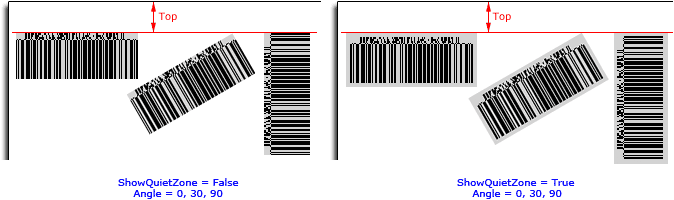
When the linear component of TBarcode2D_CCA, TBarcode2D_CCB, or TBarcode2D_CCC component is TBarcode1D_UPCA, TBarcode1D_UPCE, TBarcode1D_UPCE0, TBarcode1D_UPCE1, TBarcode1D_EAN8, TBarcode1D_EAN13, or TBarcode1D_EAN128, and its human readable text is represented. The human readable text and the vertical spacing between the text and linear symbol are included in the symbol. If the TextAlignment property isn't set to taCustom, and the human readable text exceeds entire EAN.UCC composite barcode symbol in horizontal direction, the excess is included in the symbol. If the TextAlignment property is set to taCustom, the width of quiet zone marks and their horizontal spacing (LeftQuietZoneSpacing and RightQuietZoneSpacing) are included in the symbol too (if they are represented, this does not apply to TBarcode1D_EAN128). The parameter always specifies the top margin for entire rotated EAN.UCC composite symbol. See diagram (the SpaceColor parameter value is set to clSilver in order to accentuate the quiet zones):
See also the "TopMargin" property.
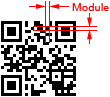
Module: Integer; Specifies the module size in logical dots or pixels in the horizontal direction.
For the Matrix 2D barcode symbology (excluding the TBarcode2D_MaxiCode barcode symbology), the module is single cell (a suqare shape) used to encode one bit data. The parameter specifies the module width and height. See diagram:
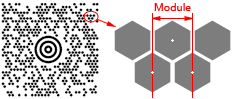
For the TBarcode2D_MaxiCode barcode symbology, the module is single cell (a regular hexagonal shape) used to encode one bit data. The parameter specifies the horizonal width of a module. Also, it's the center to center horizontal distance between adjacent modules. See diagram:
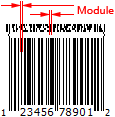
For the Stacked 2D barcode symbology and Linear 1D barcode symbology, the module is the thinest bar (or space) in the barcode symbol. The parameter specifies the module width. See diagram:

For the 2D component TBarcode2D_CCA, TBarcode2D_CCB, or TBarcode2D_CCC, if its Linear property is set, the 2D symbol and the linear symbol are assembled to generate an EAN.UCC composite barcode symbol, the parameter specifies the module width for entire EAN.UCC composite barcode symbol (including both 2D and linear symbols). See diagram:
See also the "Module" property.
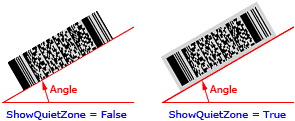
Angle: Integer; Specifies an angle in degrees to rotate the barcode symbol and its quiet zones (if they are represented, please read the ShowQuietZone parameter section above about whether or not the quiet zones will be represented) anticlockwise. You can use the LeadingQuietZone, TrailingQuietZone, TopQuietZone, and BottomQuietZone properties to specify the size of these quiet zones in modules. And use the ShowQuietZone parameter to specify whether to represent these quiet zones. See diagram (the SpaceColor parameter value is set to clSilver in order to accentuate the quiet zones):
For the 2D component TBarcode2D_CCA, TBarcode2D_CCB, or TBarcode2D_CCC, if its Linear property is set, the 2D symbol and the linear symbol are assembled to generate an EAN.UCC composite barcode symbol, and they will be rotated as an entirety. See diagram (the SpaceColor parameter value is set to clSilver in order to accentuate the quiet zones):
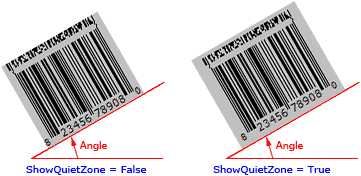
The parameter defaults to 0 if the Angle is not provided, meaning left to right horizontal direction.
HDPI: Integer, Specifies the horizontal resolution of canvas in logical DPI. It's the number of logical dots or pixels per inch. It defaults to 0 if the HDPI is not provided, and the physical horizontal resolution obtained from the Canvas parameter will be used. So if you use the MM_TEXT map mode, you can specify it to 0. If you use the MM_ISOTROPIC or MM_ANISOTROPIC map mode, and the horizontal units or scaling is changed, the parameter is required in order to represent the correct barcode symbol when the symbol is rotated.
VDPI: Integer, Specifies the vertical resolution of canvas in logical DPI. It's the number of logical dots or pixels per inch. It defaults to 0 if the VDPI is not provided, and the physical vertical resolution obtained from the Canvas parameter will be used. So if you use the MM_TEXT map mode, you can specify it to 0. If you use the MM_ISOTROPIC or MM_ANISOTROPIC map mode, and the vertical units or scaling is changed, the parameter is required in order to represent the correct barcode symbol when the symbol is rotated.